



LetteringDelights.com LetteringDelights.com  
Little Lettering Delights
  1. Welcome
  2. Creative Corner
  3. New Alphabets and Fonts

Http://www.LetteringDelights.com

 
Anything that can be typed can be enhanced with a little Lettering Delights creativity. This month, it's a reminder notice or flyer. Whether it is for a fun get-together, an important neighborhood meeting or anything else you might need, chances are really good there is a Letting Delights Alphabet and/or Font that would be a perfect fit. (And, if you think of a theme we don't have the perfect Alphabet for, send us your idea for the monthly Alphabet contest.

It doesn't take any extra time to make something that could have been plain and simple, into something that is more eye-catching, interesting and compelling to read. Making a flyer in the Lettering Delights Browser is a simple process and the results are well-worth it!

Michelle Howe

Michelle Howe
Michelle@LetteringDelights.com

P.S. Share LetteringDelights.com with your friends and you'll both receive a special think you - a coupon code good for $5 off a LetteringDelights.com purchase of $15 or more. As new newsletter subscribers, your friends will also receive seven fun and creative Lettering Delights fonts.

Here's how you get started:

  1. To get started, open your browser and go to Alphabets. Select the alphabet that best fits the theme of your meeting or event.
  2. Type your text and add it to the clipboard.
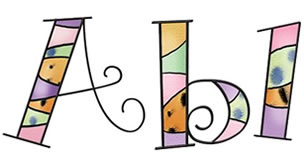
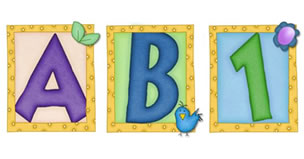
    Remember that you may want to use a variety of upper and lower case letters to get just the right combination of alphabet letters. For example, 'Ice Cream Social' looks like this:


    But, 'IcE CrEAm SOcIaL' looks like this:


  3. Move to the Layout page and place your Alphabets 'title' on the page.
  4. Size the image appropriately for the size of flyer you are planning to make; full page size, half page, or even smaller.
  5. Click Add Text, select a font and type the additional information needed on your flyer or handout and then 'OK'.
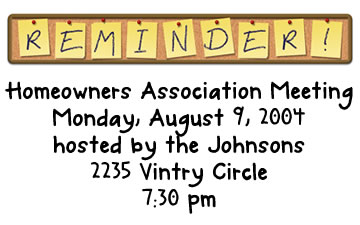
  6. Move the text and alphabet image around to get the look that you want, centering text or making other visual changes. If you are placing more than one 'flyer' on a page, make one complete version and then copy and paste the parts to the other half of your layout page, as I did with the Homeowners Meeting reminder.
  7. Print and distribute your flyers and plan for a great turnout!

There are lots of creative things that you can use these tags for, in addition to luggage. Make special tags to tie on kid's lunches or camping equipment. For anything that needs identification, a quick Lettering Delights tag will make it fun and easy to spot. And don't forget to send us samples of all the creative ways you are using Lettering Delights products for the monthly Inspirations contest. Click here for all of the contest details and information on submitting your work.

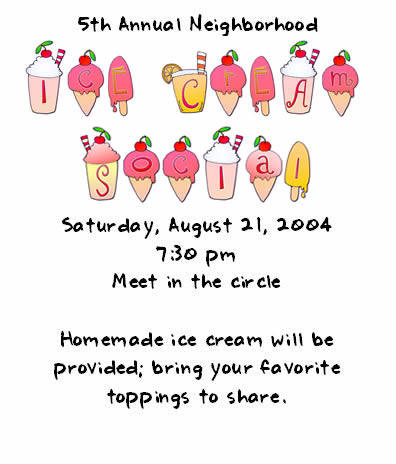
Here are some samples. All items used were from the Lettering Delights Supreme 3 CD:


Items used:
Alphabet - Jillustration Tasty Treats
Font - LD Notepad (free with subscriptin to the newsletter)

Items used:
Alphabet - Corkboard
Font - LD Dabble

New Alphabets and Fonts

The following alphabets and fonts are now available for individual purchase on LetteringDelights.com:

So come on over to Http://www.LetteringDelights.com and be sure to bring along a friend!


©1999 - 2004 Inspire Graphics, Inc.
PO Box 935
Pleasant Grove, UT 84062